TL;DR
- Job descriptions and company news can reveal changes worth investigating. Start with the change your offer can help with, then read the original sources.
- The open-source Buying Window Signal Scorer uses SearchApi to build a shortlist with editable profiles, source links and a request cap.
- A score prioritises research; it does not establish purchase intent. Discovery, watchlists, CSV/JSON exports and local replay support the next step.
How you can use job descriptions and company news to spot timely B2B changes, score the evidence, and review every source with an open-source SearchApi tool.
When I’m researching an account, one of the things I often struggle with is how to contextualise job alerts.
The fact that a company has put out a job advert for an Operations Manager, for example, doesn’t actually tell me very much. Are they replacing someone? Do they need someone to focus on a new market? Are there operational issues that they’re trying to resolve? Do they need someone to build a team? The detail is there somewhere within the job advert, but it’s often buried in a list of responsibilities.
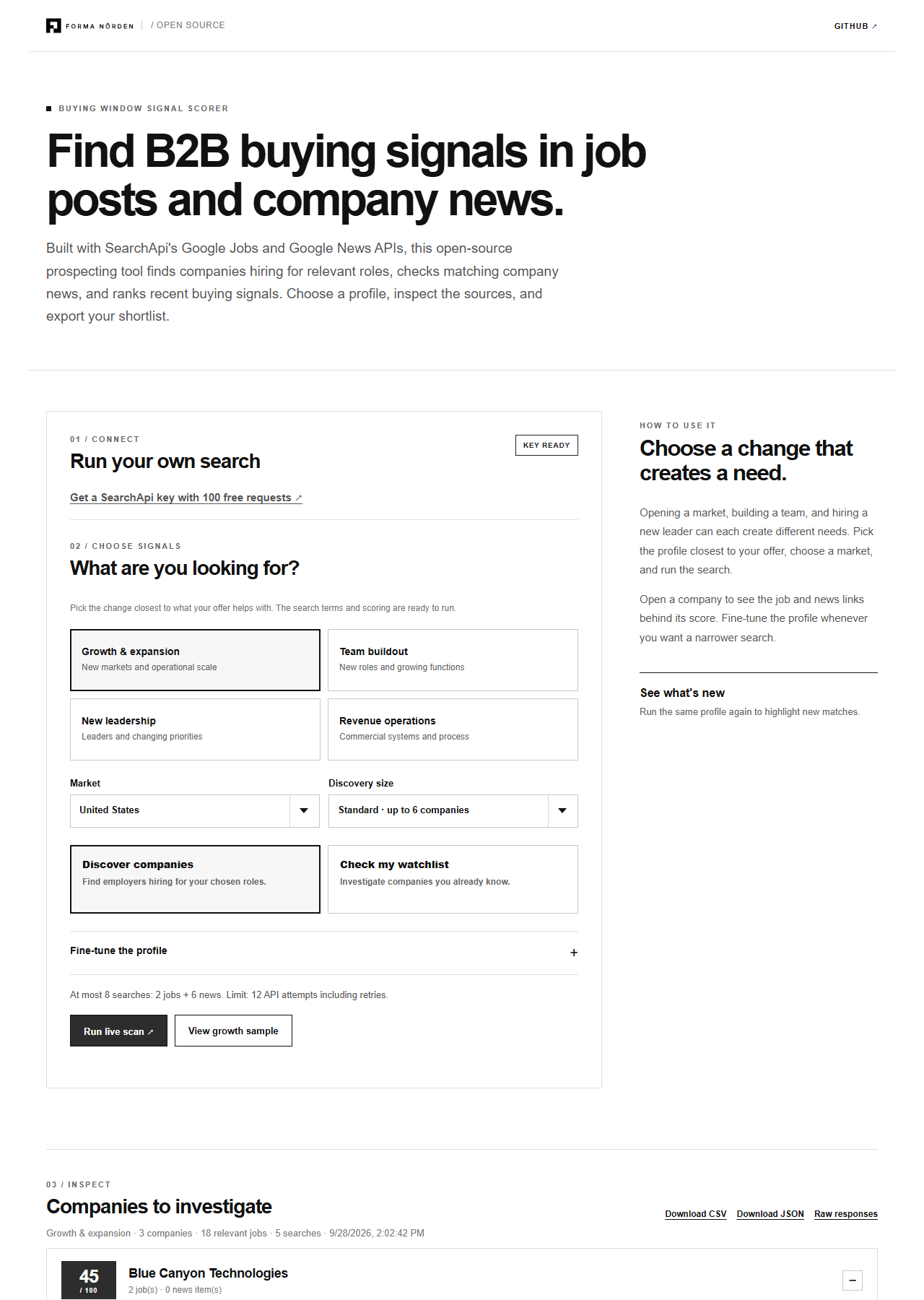
To try and make my research a bit more consistent, and a bit less ad-hoc, I built the Buying Window Signal Scorer. It’s an open-source Python application that uses SearchAPI to search Google Jobs and Google News and ranks the results based on a set of rules that you can easily edit.
The point is not to turn hiring into a proxy for purchase intent. It is to get from a broad account list to a shorter queue of source documents worth reading.
Disclosure: SearchApi sponsored this article and supplied API credits for the build. Forma Nôrden built the app, scoring rules and article.

Start with the change you want evidence for
What kind of change should I be searching for?
| Your offer | Change worth finding | Clue in a job post | News that could add context |
|---|---|---|---|
| Logistics or process software | A new market or facility | Operations role tasked with opening a location or scaling a network | Market entry or facility announcement |
| Recruiting or training | A new function or growing team | First hire, team lead or several roles in the same function | Funding or announced hiring plans |
| Implementation services | A leader changing a process | Senior role with a systems or transformation mandate | New executive appointment |
| CRM or revenue systems | New ownership of commercial operations | Sales-operations role that will implement or rebuild a stack | Commercial leadership change |
In the context of a service like warehouse planning, the role of operations manager might be good to search for when you’re trying to figure out who to talk to at an organisation, but it’s probably not a good role to target, since you wouldn’t make someone an offer simply because they have that title. On the other hand, if someone is responsible for opening a new distribution centre, that might be a lot closer to the mark.
I’ve built four buyer profiles into the app (growth & expansion, team buildout, new leadership and revenue operations) which contain a set of queries for jobs, strong titles, adjacent titles, job description keywords, news keywords and weights for each signal type. You can easily change these in the dashboard if you want to explore different combinations.
What does the app actually do?
There are two modes of operation:
Discovery: Find a set of jobs on Google Jobs relevant to a given profile and market, grouped by employer. Deduplicate job listings and limit the number of companies to look at to a bounded amount.
Watchlist: The first list used by the application in watchlist mode is the company list. This is a list of accounts you are already interested in. You can add aliases here if you want to search for those as well. These are used to search for these accounts in the role lists as well as for news about these companies.
A run of the application in discovery mode would result in search requests such as:
{"engine":"google_jobs","q":"operations manager","location":"United States","gl":"us"}
{"engine":"google_news","q":"\"Example Company\" (funding OR expansion OR appoints)","gl":"us"}
The first search is used to find potential employers. The second search will only be executed for companies that made it to the employer shortlist. The order is chosen this way to reduce the total number of search requests.
Before points can be given there are some simple checks done to make sure the right person/company is found. For jobs this is easy since each job is linked to a company, the employer, which is returned by the job search. For news items, the company name needs to be part of the title and at least one of the events you provided, otherwise the item is disregarded. It does not help if the company is mentioned in the snippet text. This might seem harsh, especially if your company name is short and only one word where many homonyms exist, but it is important to do these simple checks first before you start considering points.
These checks are boring, but extremely important.
Why a 45-point result can still be useful
The default growth profile totals 100 points:
| Evidence | Points | What earns it |
|---|---|---|
| Role and mandate | Up to 40 | Matching title, strengthened by a relevant responsibility in the description |
| Job recency | Up to 20 | Matching posting dated within 30 days |
| Company news | 25 | Dated event whose headline names the company |
| Both sources | 15 | A qualified job and qualified news event for the same company |
To get the top score, the ideal news post would contain a strong job title (25 points), it would have to be recent (20 points), and the description would need to include one of the phrases from the mandate (40 points). If the system also finds a match with a company news post headline then it can add 25 points to the score. The final 15 points are gained by having both a job and news post match.
In the bundled sample data, there is a job post for the fictional company “Harbor Foods” that contains the team building mandate for a new market. There is also a sample news headline regarding their expansion. This is provided so that the dashboard can show how the maximum score of 40+20+25+15 is calculated without using any of the API requests.
For interest, I ran it live and the result was a little less neat:
On 28 September 2026, I ran the growth profile with a three-company cap. The app made a number of requests to the Jobs API, returning 19 relevant (de-duped) jobs, then made 3 further requests to the News API (because 3 companies had been selected), making a total of 5 requests to SearchApi. No requests failed.
Each of the three selected companies has a score of 45 (that’s for recent job titles), they didn’t pick up any news as part of the scan. Which is fine. It’s still worth having a look at the job description and seeing if it’s relevant.
So don’t worry if you only get 45s, have a read of the dated run note and see if it’s relevant.
Things you may want to save to your account prior to outreach
In preparing your account for outreach, you may want to save the following:
- Why the new responsibility or change in the company is of interest to you
- The URL and date of the source document
- The name of the employer, if mentioned in the source document
- Why you think this is important to your offer
- A question you have you'd like answered
Suppose a posting says a new operations lead will open a regional distribution centre. A warehouse-software company may want to understand the rollout, systems and owner of that programme. A recruiter may look at which roles the new lead still needs to hire. They are reading the same document, but they are testing different hypotheses.
To ensure the app doesn't hallucinate evidence to support a claim, it's important to include the source of that evidence, and the specific line it pertains to, when making a claim.
This project is part of my open source library of workflows. The Signal-Based List Building Workflow walks through how to pick your sources and get a list of targets to investigate. The Buying Window Signal Workflow explains what to do after you’ve verified a signal.
Request cost and replay
As of this writing, when you first sign up for a SearchApi account, you get 100 requests for free. By default, the app will make two request to the Jobs endpoint and up to six requests to the News endpoint. That’s a total of 8 requests to run the initial search.
The app shows you how many requests you’ll use on the dashboard, and then enforces that number (or whatever you set the attempt cap to, to account for retries) on the client.
When you run the app, it stores the raw response from each search on your local machine, with sensitive values redacted. This is helpful for two reasons. First, if you want to update your scoring logic, you can re-run the app with the same search and it will replay the results without making additional API calls. Second, if you want to re-scan a target after some time has passed, the app will mark any jobs or news that are new (relative to your previous search using the same settings) when you re-run the search live. When you’re happy with your shortlist, you can export it as a csv or JSON file.
That said, at eight requests per run, you can scan a decent number of targets (12, to be exact, with 4 requests to spare) before you need to make additional API calls, if you’re using this as part of your monthly workflow.
Run your own search
Find it on Github. The code is open source, licensed under the permissive MIT license. You'll need to have Python 3.11+ and a SearchApi key to run it.
You can install and run the dashboard locally by following the quickstart guide in the repo. You don't even need an API key to load the provided sample (of a fictional company, for demonstration purposes).
I'd suggest starting small – a single IC profile, a single market, a short list of companies. Open the sources that appear at the top of the list. If the results are too broad, start adjusting the job titles and mandate phrases. That will be more useful than tweaking the weights.
If you already know which accounts you want to evaluate, you can enter them in the watchlist box. The app will tell you how many API requests it'll take before starting the scan.
Some FAQs, for the more curious:
What kind of jobs are you looking at?
Any job where the responsibilities mention creating or changing something – building a team, entering a market, implementing a system, opening a facility, etc. The job description is what matters, the title is used only for searching.
Why are you looking at company news?
It's mostly for context – to understand what's happening at the company that would require this hire. The company gets points in the app only if there's a recent news headline (with a date) that mentions the company by name and is relevant to the selected profile.
Can't you just run the app on a list of companies you already know?
Sure, that's what the "Check my watchlist" box is for. Enter a list of companies (one per line) – you can even include alternate names, to help with the search. The app will estimate the number of API requests it'll make (to Jobs and News sources), before scanning the list.
Does a high-scoring company mean they're ready to buy?
No. The score orders source documents under the profile you chose. It does not know whether the company fits your commercial criteria, has budget, has already selected a supplier, or is even solving the problem in a way your offer can help with. Those are research and conversation questions, not things this score can infer.